Introduction
This document contains all you need to get started with using the different Geckotools Hosting Services. Each section will describe a different product or service, so you can navigate directly to what you are interested in using the navigation menu to the left.
If you have any questions or suggestions, please do not hesitate to reach out. You can provide feedback by creating a support ticket here or by logging into the Customer Console if you are already a client and creating a ticket from there.
Overview of Products and Services
Geckotools provides different hosting services. Our main focus is to provide managed servers with a complete tech stack to allow developers to host their software on the stack of their choice without having to spend unnecessary time and money to manage the servers, tools and frameworks needed to keep your software safe, secure and running efficiently.
Today there are several options to host your software products:
- Use cloud based instances where you have no idea of the cost until after the fact and you still have to manage security and updates yourself, or you can use a traditional VPS
- Use a traditional VPS with a fixed monthly cost, but manage the whole tech stack and security yourself
- Use a Managed VPS provider to handle everything for you, but be prepared to pay the top price.
Or use the Managed Application Server Service of Geckotools. This gives you:
- Fully managed application server stack
- Complete monitoring and maintenance of your servers including security updates.
- Significantly lower costs than traditional managed servers or cloud based servers.
So how can we do this?
We only support a limited set of web application server tech stacks. This allows us to define a standard template that we can roll out and maintain using the current technologies available. So, the more servers we have running with the same template, the more cost effective it becomes for us to manage and maintain the stack and keep it updated and secure.
Products
Managed VPS
A managed VPS is a standard VPS consisting of 3 main features:
- Server Specification (Memory, CPUs, Disk size etc)
- Server Template (Software stack)
- SLA (What we do to keep everything up and running)
Web Hosting
Our web hosting packages are based on the popular CPanel software for managing and maintaining you websites. If you want to become a reseller, it may be financially more advantageous to order a VPS with a CPanel server template. This way you pay a fixed fee and can resell as many CPanel accounts as you want as long as you stay withing the specifications of the server.
There are 3 flavours of Web Hosting packages as described on the Geckotools Web site: TODO
- WH-BASIC
- WH-STANDARD
- WH-PROFESSIONAL
Domains
Services
Service/Provider Comparison
This section takes a look at the alternative hosting options mentioned in the overview section in order to provide a means of comparing each product or service in a more equal way.
These are the options we will compare. If you know of other alternatives and would like to see how it stacks up, let us know.
- Cloud based servers
- Standard VPS
- Fully managed servers
TODO: Compare on price, price clarity + what you get, what you need to do yourself,
TODO: Provide a full overview of the drawbacks of Geckotools as well.
Geckotools Customer Console
The Customer Console provides a technically seperated interface for customers to manage the software running on their servers without being able to negatively impact the security measures put into place for the servers. In short, Geckotools lets you manage your software while we manage you security - to each his own.
It can also be used to create Support tickets for the Geckotools Support Team thereby combining all your support requests in one central place. This way you can activly follow the status of you request and easily find all communication related to a specific request.
To log into the console go to the following URL: https://console.geckoapps.nl/login/auth
Depending on your credentials you can have access to subscription management (Servers, Domains, Certificates and Webhosting) and/or Support
Subscription management
After you have logged in to the console you will see all the subscriptions you have access to in the left menu.
Servers

- On clicking Servers you can access all your active application servers
- Click on the button "Show cancelled" to see your cancelled servers as well
- Double click on a server to access further functionality
Applications
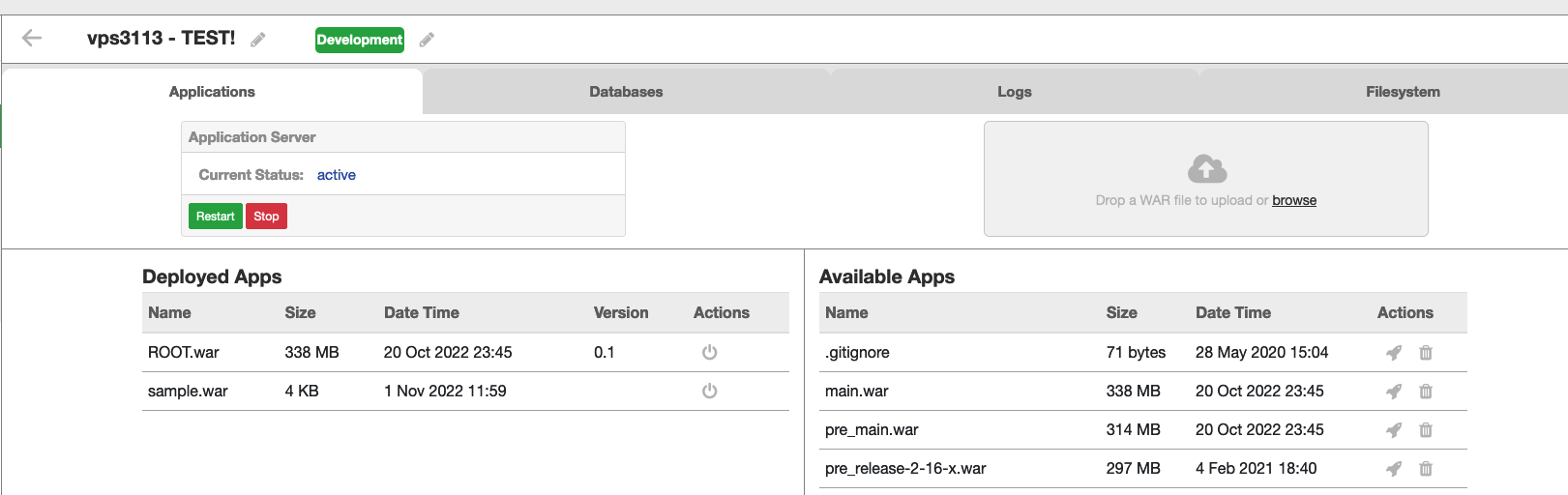
- On this screen you can see the status of your application server
- You can Stop or Restart the app server
- Under Deployed Apps you can see the .war files that are currently deployed on your server.
- With the
 icon you can undeploy a .war file
 - On the righthandside you can upload a new .war file. The .war file will then appear in the list of Available Apps
- Click on the
 icon to deploy the war file
Databases
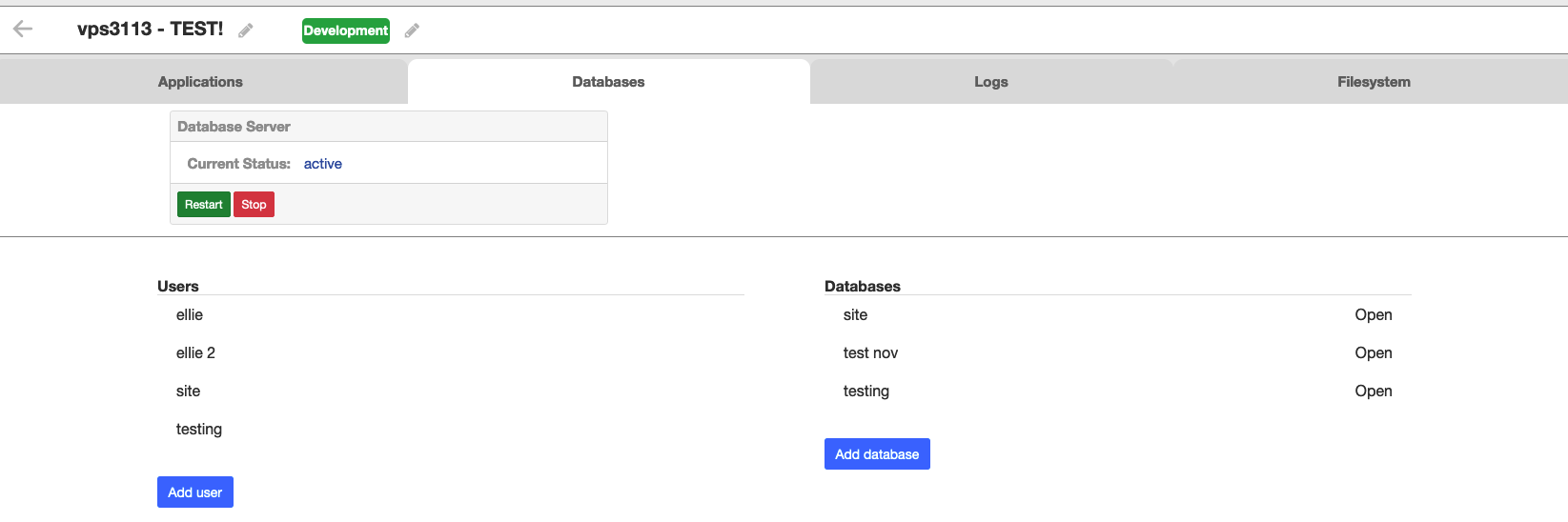
- On this screen you can see the status of your database server
- You can add a new user
- You can add a new database
- When creating a new database you can create a new user simultaneously
- Double click on a db server to access further functionality
- On the specific database screen you can:
- Access PHP PG Admin
- Import a database dump file
- Delete a database
- Download a database - you can download all tables or select the tables you wish to download beforehand
- By using the tabs at the top you can navigate to your other databases
Logs

- On the Logs screen you can tail the current cataline.out log
- By clicking on the name of a file on the right you can download a specific log file for further inspection
Filesystem
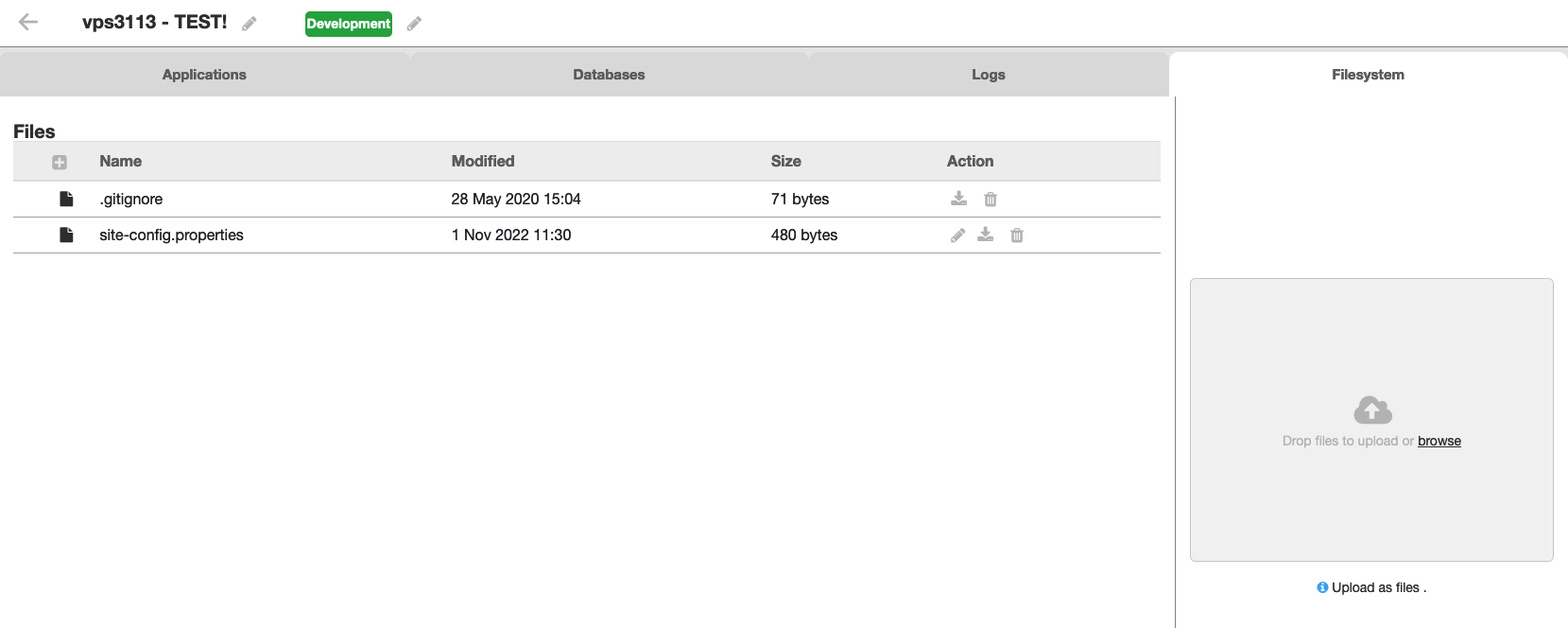
- On the Filesystem screen you can see the files currently uploaded to your server.
- Click on the "pencil" icon to edit a file
- You can also download or delete a file
- On the righthand side you can upload a new file
Domains
- Under domains you can see your active domains
TODO Expiry date weghalen want die is niet accuraat? TODO STATUS toevoegen
Certificates
- Under Certificates you can see your active certificates TODO Expiry date weghalen? TODO Status toevoegen?
Hosting
- Under Hosting you can see your current CPanel hosting sites
- By clicking on "Go to your cpanel account" you can access your Cpanel environment
Support
TODO image of support screen
To go to your support tickets or to create a new support ticket for the Geckotools Support Team click on the Support button top right
- You see an overview of your reported tickets
- You can click on a heading to sort
- You can search by subject or ticket id
- Below left you can click the "show resolved tickets" to look for tickets that have been solved.
Click the create new ticket button to create a new ticket
- You can choose whether the issue applies to a
- subscription (when we do not host any servers for you or your question/problems does not relate to a specific server)
- VPS (when the issue relates to a specific server)
- In the next screen choose the specific vps and click next
- On the Creat ticket details page fill in the question / problem / request with as much detail as possible.
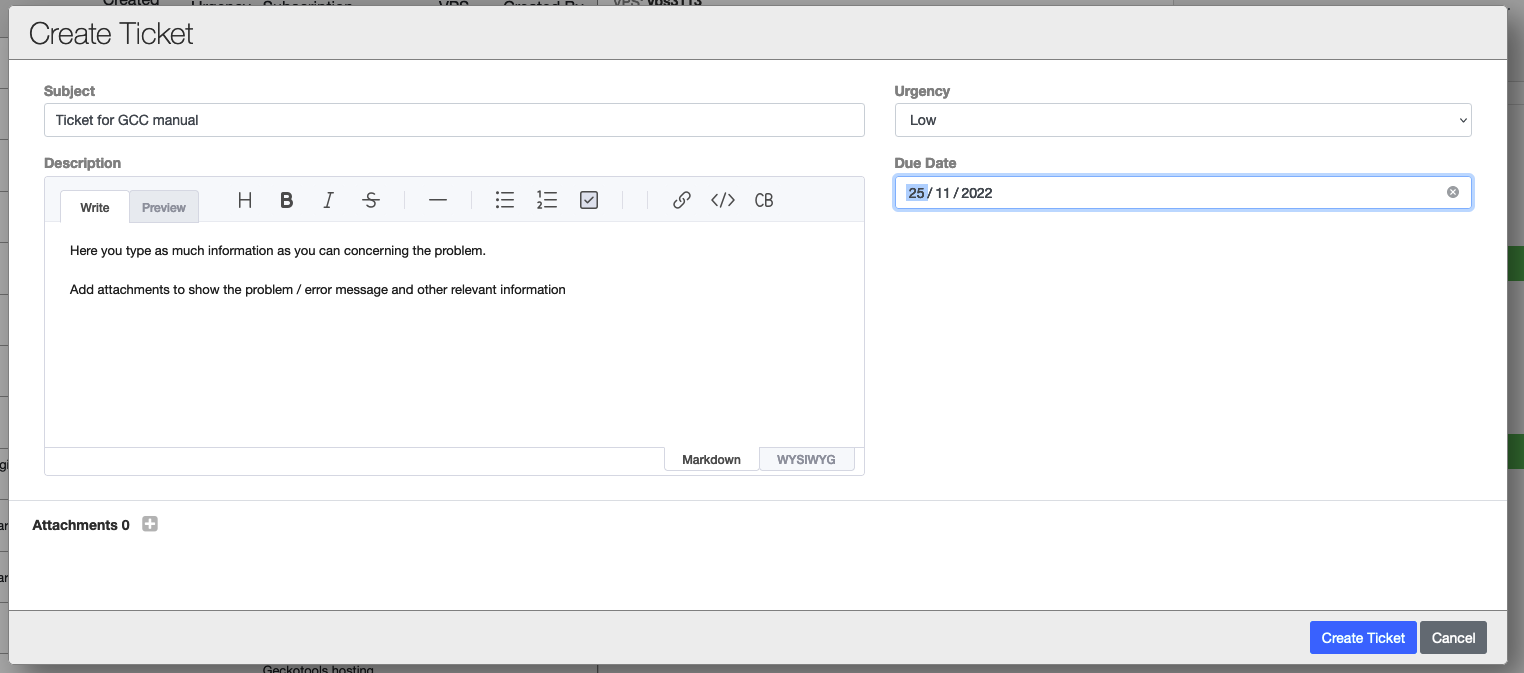
- Add any attachments that may help with trouble shooting
- Select an urgency and a due date (may be left open)
- Click on create ticket
- Your ticket will become visible in your ticket overview screen
On the right you can see the details of the ticket.
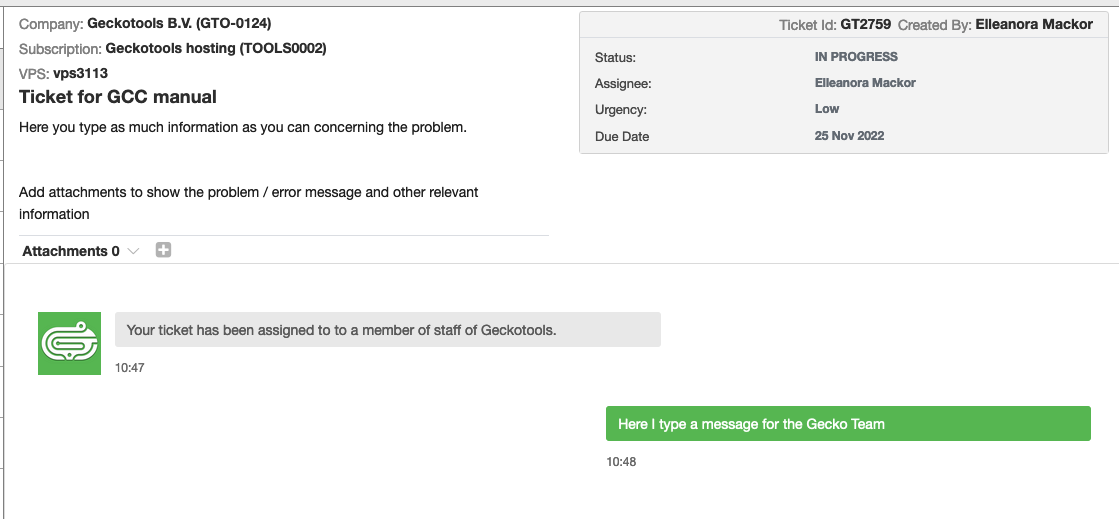
- You can add extra attachments to the ticket if needed
- On the right the status and assignee will be updated once the ticket has been put into progress
- You will also receive messages through notifications and via email indicating what is happening with your ticket
- Or you may receive a follow up question from the Support Team
- In the "type a message" field you can answer the question or type extra information you want to bring to our attention
Account management
- By clicking on your name you can access Account management
- Here it is possible to add users to enable them to also access the Console and create Support tickets
TODO change remove to disable
Chapter 1: Managed VPS
How do you order a new VPS
Visit the Geckotools Site and select the VPS you need
What are the options
The site will provide you with the most up to date options (this may change frequently as we provide new possibilities or discontinue certain options.).
There are four main factors that determine you choice:
- Server Specs:
- Server Template:
- SLA:
- Deployment destination: TODO - this is not yet available from the store
The price of your selected Managed VPS is determined by the sum of the cost of the individual items you selected above. Please note that in the case where the Deployment destination is an external cloud provider, the actual cloud costs are directly billed to the customer and will not be seen on the Geckotools invoice for the provision of the selected products.
How do you manage your VPS
Geckotools provides a Customer console that allows you to manage the software you install and deploy to your server. This web interface protects you from being able to accidently break system security.
However, as a modern customer that develops their own software, you will want to deploy your software using your existing CI/CD toolset. TODO - provide Geckotools CD API